

Run on SLURM#
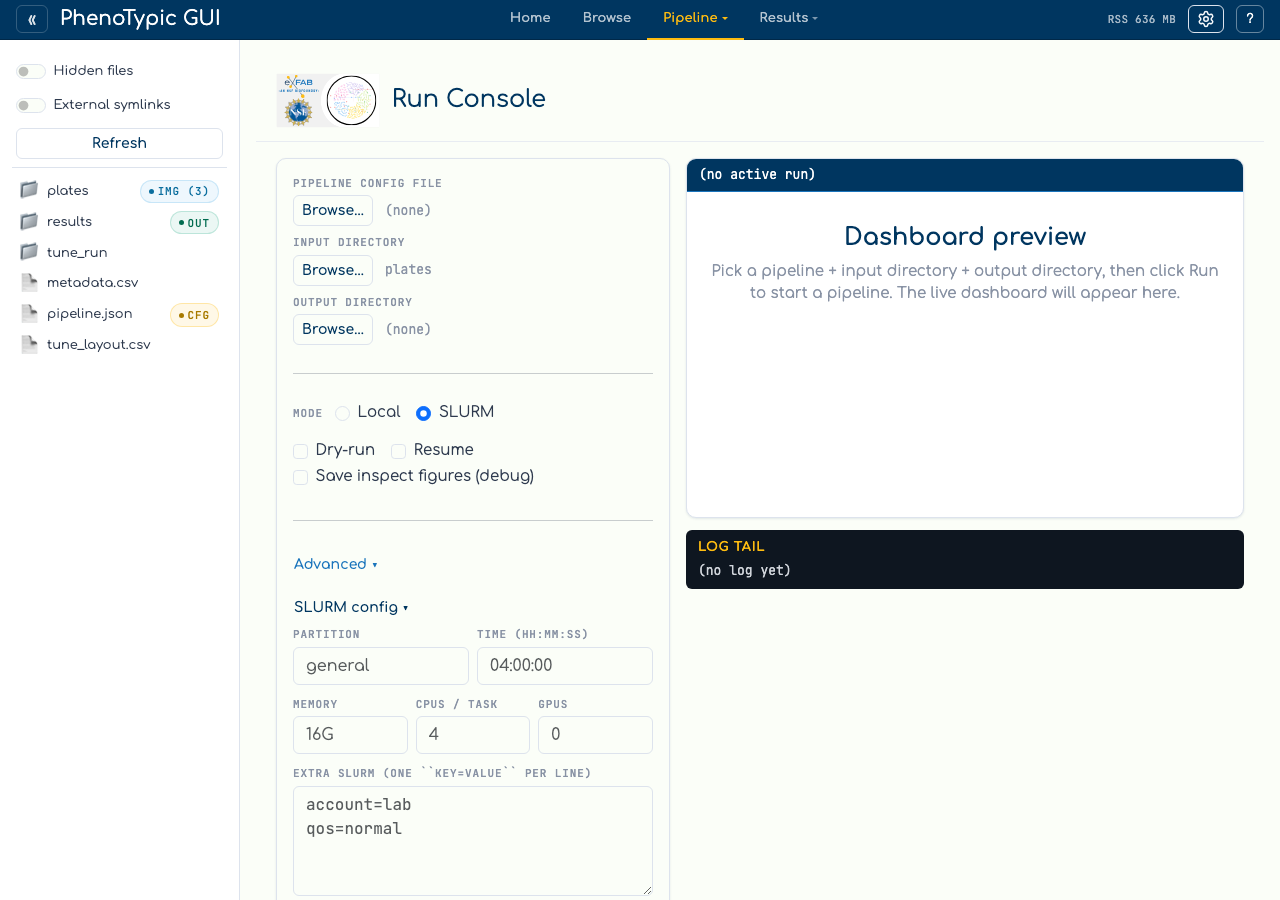
The same Run console form submits to SLURM when you toggle Mode from
Local to SLURM. The hub shells out to the existing
phenotypic._cli._cli_slurm_submission pathway — the same code path used
by phenotypic --pipeline pipeline.json --input input/ -o output/ --slurm partition=general --slurm time=240.
Switch to SLURM mode#
Click the SLURM radio in the form. The SLURM config collapse opens
with the typed common fields:
Field |
Maps to |
Notes |
|---|---|---|
|
|
Required. Use the partition your cluster admin assigned. |
|
|
SLURM walltime cap. |
|
|
Per-node memory (e.g. |
|
|
Maps to |
|
|
Set to 0 unless your pipeline needs a GPU detector. |
|
repeated |
Free-form pass-through for anything not in the common fields ( |
Submit#
Clicking Run while SLURM mode is active does not spawn a local
subprocess. Instead it hands the form values to a background thread that
calls phenotypic … --slurm key=value … against your SLURM cluster.
The hub waits for the submission to finish (typically <1 s for small
arrays), then registers the returned array primary job id with the run
registry. The Recent Runs panel surfaces the row as
Mode: slurm-<job-id> with status pulled from the manifest as the array
chunks finish.
Warning
This page captures the form filled out, not a successful submission.
Submitting requires sbatch on PATH and a real SLURM cluster — neither
exists on the workstation that captured these screenshots. To verify your
form values translate to the right CLI invocation, switch back to
Local mode and click Validate (dry-run): the dry-run prints the argv
the hub would pass to phenotypic. Once you’re satisfied, switch back
to SLURM and click Run.
What SLURM submission writes#
A successful submission writes:
<output_dir>/progress/job_metadata.jsonwith the array primary job id and per-chunk job ids. The hub reads this file to surface theslurm-<id>row in Recent Runs — it does not parse Rich-formatted stdout (locale and terminal-width fragile).<output_dir>/deliverables/dashboard.html(written by the CLI submission flow), so the iframe panel can point at the dashboard before any chunk completes.
For deeper SLURM operational detail (chunk sizing, recompile-on-resume, per-chunk cgroups), see SLURM Pipelines.
Next: View Results.