3.8 Review and Resolve Naming and Validation Problems#
Capability summary#
The Problems tab is a persistent surface, updated automatically by the
same background refresh that powers the browse view, that lists every
flagged item under the configured local_root (and the orchestrator
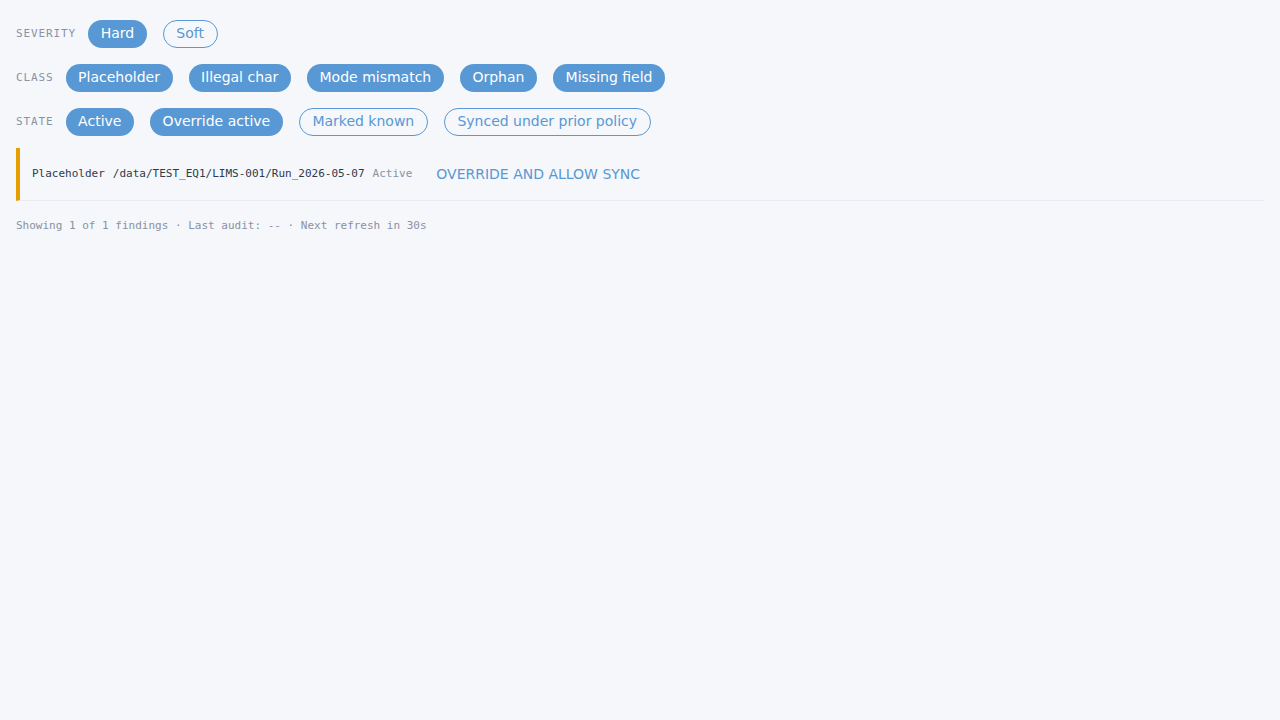
staging_root when enabled). The validator surfaces five problem
classes – unresolved placeholder tokens, illegal filesystem
characters, mode-prefix mismatches, orphans, and missing required
README fields – with two severity tiers (hard and soft). Hard-tier
problems block NAS sync via the Pre-Sync Gate (section 02 §7) until
the operator either resolves the underlying problem or explicitly
overrides with a logged reason. See section 02 §3.8 for the
authoritative contract.
Walkthrough#
Open the Problems tab. Either navigate directly to
/problemsor click the Problems tab inside the main window (data-testid="tab-problems").Inspect rows. Each row (
data-testid="problems-row-<idx>") shows the severity tier, problem class, the offending path or file, and the gate status. Filter chips constrain the visible set.Take action. For hard-tier rows that are currently blocked from sync, the override button (
data-testid="problems-row-<idx>-override") opens the override dialog; the operator supplies a non-empty reason and confirms. The override is appended towizard.<hostname>.log. The revoke button (data-testid="problems-row-<idx>-revoke") reverses an active override.
Screenshots#