

Run on SLURM#
The same Run console form submits to SLURM when you toggle Mode from
Local to SLURM. The hub shells out to the existing
phenotypic._cli._cli_slurm_submission pathway — the same code path used
by phenotypic --pipeline pipeline.json.pht-pipe --input input/ -o output/ --slurm partition=general --slurm time=240.
Switch to SLURM mode#
Click the SLURM radio in the form. The SLURM config collapse opens
with the typed common fields:
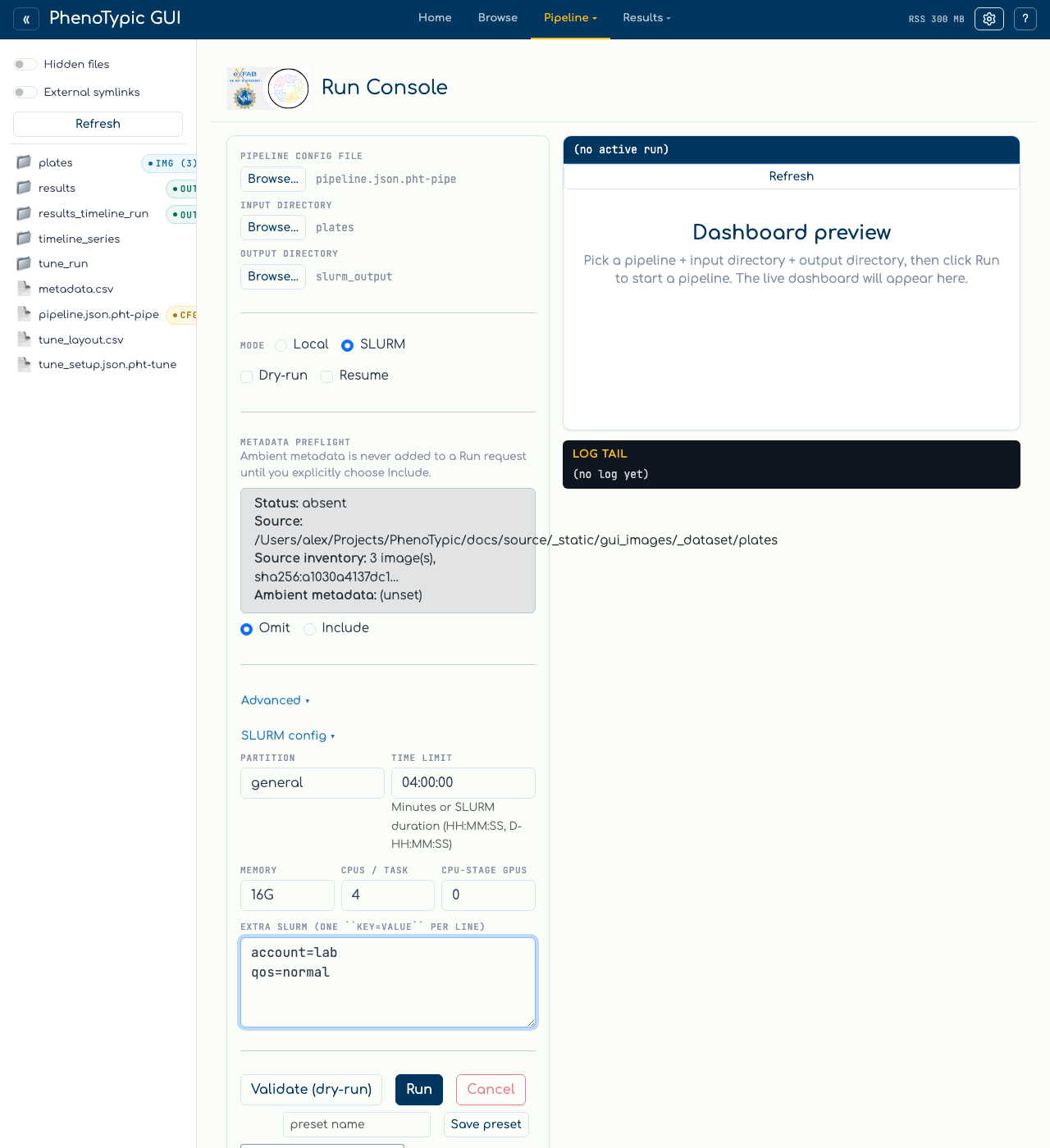
Field |
Maps to |
Notes |
|---|---|---|
|
|
Required. Use the partition your cluster admin assigned. |
|
|
SLURM walltime cap. |
|
|
Per-node memory (e.g. |
|
|
Maps to |
|
|
Set to 0 unless your pipeline needs a GPU detector. |
|
repeated |
Free-form pass-through for anything not in the common fields ( |
Submit#
Clicking Run starts a short local submitter that calls phenotypic … --slurm key=value … against your cluster. The run registry allocates a
durable generation before submission. Recent Runs then follows
generation-bound scheduler, controller, and finalizer evidence through
queued, reconciling, running, terminal, and cancelling states. This
works for ordinary arrays and staged GPU controller lifecycles without
confusing an older attempt with a new one.
Warning
This page captures a fully selected pipeline, input, and output plus form-valid
SLURM fields. The capture does not launch a dry-run generation or submit to a
scheduler.
Submitting requires sbatch on PATH and a real SLURM cluster — neither
exists on the workstation that captured these screenshots. To verify your
form values translate to the right CLI invocation, click
Validate (dry-run): the dry-run validates the selected paths and prints the
argv the hub would pass to phenotypic. Once you’re satisfied, click Run.
What SLURM submission writes#
A successful submission writes lifecycle evidence under the output directory.
The submit script uses sbatch --export=ALL. PhenoTypic also snapshots the
caller’s PYTHONPATH internally as PHENOTYPIC_SLURM_PYTHONPATH; generated
ordinary, staged, and recovery scripts restore that snapshot before starting
Python on clusters that filter PYTHONPATH. Users set PYTHONPATH normally and
do not set the internal variable themselves.
An explicit GUI cancellation remains authoritative until it settles, even if publication becomes visible. When there was no explicit cancellation, an ordinary run whose scheduler fence is inactive but whose successful publication is visible reconciles through the finalizer and is never autonomously reported as cancelled.
Key artifacts are:
<output_dir>/.phenotypic/progress/job_metadata.jsonwith the array primary job id and per-chunk job ids. The hub reads this file to surface theslurm-<id>row in Recent Runs — it does not parse Rich-formatted stdout (locale and terminal-width fragile).<output_dir>/deliverables/dashboard.html, published by the normal or staged finalizer once the run is complete.
Operational restart guidance#
Restarting the GUI does not cancel submitted work. On startup it rehydrates
durable output records and reattaches only when it can prove the matching
generation. If a restart occurs during submission, wait for scheduler metadata
and use Refresh rather than launching the same output again. Keep
.phenotypic/progress/ and staged-controller ledgers intact when redeploying
the hub.
For deeper SLURM operational detail (chunk sizing, recompile-on-resume, per-chunk cgroups), see SLURM Pipelines.
Next: View Results.